The Boutique Operating Review
A lightweight Google Sheets-based review layer for boutique hotels, villas, and small resorts — built to turn monthly PMS, POS, and P&L figures into a clearer operating review.
See what changed, what needs attention, and where to improve next — without adding another SaaS platform or building a hotel spreadsheet from scratch.
The data exists. The review structure is often missing.
Boutique hospitality teams usually have plenty of monthly information: PMS reports, booking data, POS summaries, payroll figures, management accounts, channel mix, and department costs.
The harder part is bringing those inputs into one calm monthly review, so owners, GMs, operators, consultants, and review leads can discuss what changed, where pressure is building, and what practical action should happen next.
Built for the space between your systems and your monthly decisions.
Your PMS, POS, accounting file, booking channels, and team reports may all hold part of the picture.
The Boutique Operating Review helps bring completed monthly figures into one structured review layer, so the review conversation is less reactive, less scattered, and easier to focus.
It does not replace your existing systems. It helps you review them more clearly.
Enter the month once. Review it three ways.
Add the completed month’s figures, then use the dashboard, operating signals, and guided questions to review what changed, what may need attention, and what to discuss next.
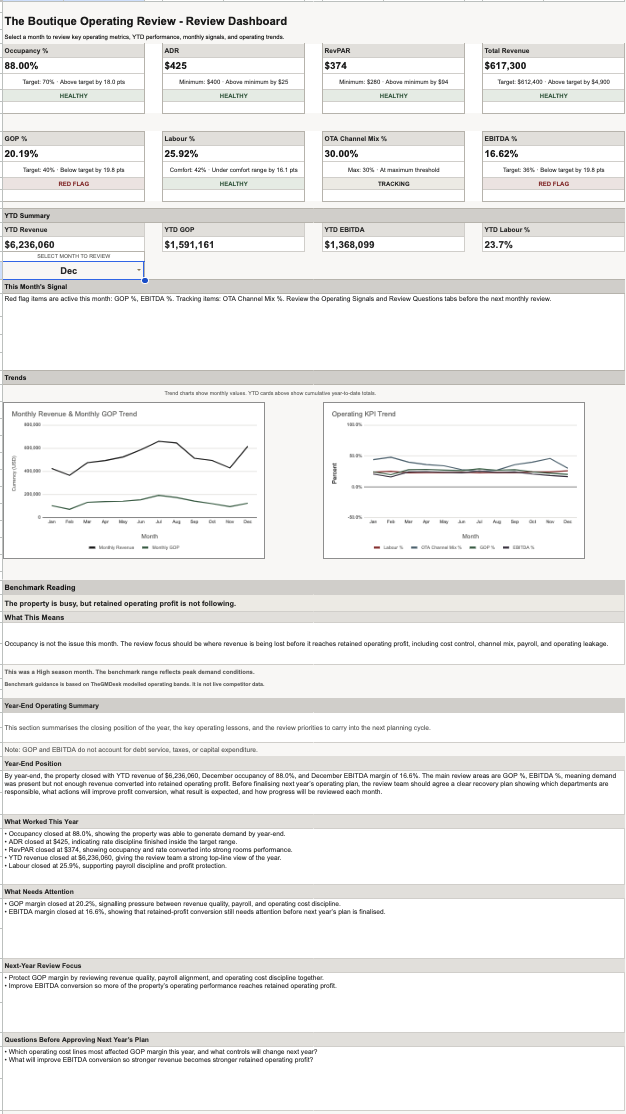
Review Dashboard
A monthly snapshot of key operating movements, revenue, profitability, occupancy, ADR, RevPAR, and year-to-date review points.
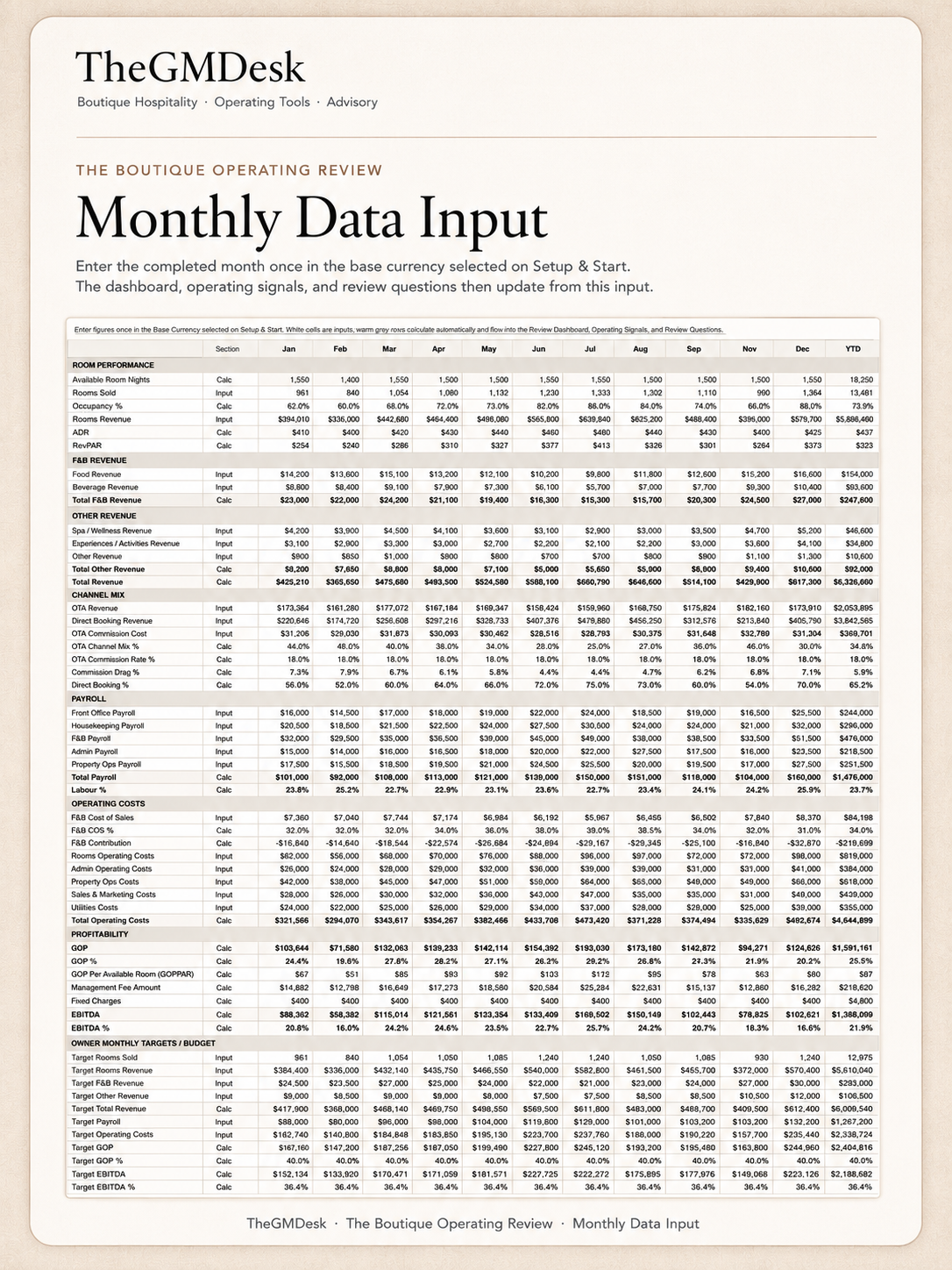
Monthly Data Input
Enter the completed month once, using figures from the reports you already rely on across rooms, revenue, channels, payroll, costs, and profitability.
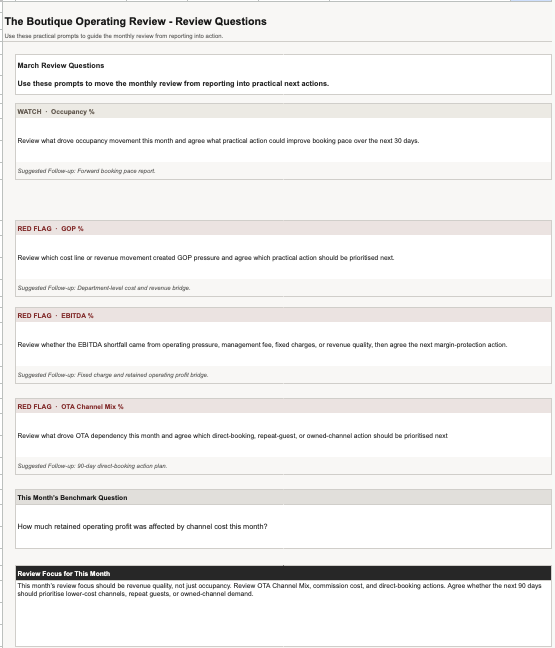
Review Questions
Practical prompts and suggested follow-ups to guide a clearer owner, GM, operator, consultant, or review-team conversation.
Turn monthly figures into a clearer operating conversation.
Most small properties do not need another complex system. They need a repeatable way to review the month, identify pressure points, and agree where to improve next.
Know where to focus before the review starts.
The workbook helps the review team move from scattered monthly reports to a focused review conversation — highlighting movement, pressure, and practical next steps.
What changed
Review key movements across occupancy, ADR, RevPAR, revenue, payroll, GOP, EBITDA, and booking mix.
What needs attention
Use Operating Signals to identify areas that may need closer review, tracking, or discussion.
What may be affecting profit
Look at revenue quality, channel mix, payroll, department costs, and fixed charges through a monthly review lens.
What to discuss next
Use Review Questions and suggested follow-ups to guide a more practical monthly conversation.
For boutique hospitality teams that need clarity without more complexity.
Built for independent properties and review teams who already have reports, but need a cleaner way to bring the month together.
- A Google Sheets-based monthly operating review system.
- A lightweight review layer between reports and decisions.
- A practical tool for owners, GMs, operators, consultants, investors, and review leads.
- A way to turn monthly figures into dashboard visibility, operating signals, and review questions.
- A repeatable structure for clearer monthly review conversations.
- Not PMS, POS, booking software, or daily reservations management.
- Not accounting software, audited reporting, tax filing, or an accountant replacement.
- Not a full hotel financial model for valuation, debt, or underwriting.
- Not automated BI software or a live integration dashboard.
- Not an automatic diagnosis engine. The team still investigates causes using source reports and operating context.
The Boutique Operating Review
Digital product · Delivered automatically through Gumroad · Requires Google Sheets
What’s included
- Google Sheets-based operating review workbook.
- Setup & Start framework.
- Monthly Data Input flow.
- Review Dashboard.
- Operating Signals.
- Review Questions.
- Quick Start Guide.
- Buyer FAQ and setup notes.
- Single-business license.
Practical notes about how it works.
The Boutique Operating Review is designed to sit alongside your existing reports, not replace the systems that produce them.
Is this hotel management software?
No. It is not a booking system, PMS, POS, channel manager, or daily operations tracker. It is designed for post-month review, once your key figures are available.
Where do the figures come from?
Use the completed figures from your PMS, POS, booking reports, management accounts, payroll summary, or other source reports. The workbook gives those figures a structured monthly review layer.
Is it just another spreadsheet?
No blank build is required. The workbook is already structured with setup areas, monthly input, dashboard views, operating signals, and review questions.
Do I need integrations?
No. You do not need to connect software or set up integrations. Enter the completed monthly figures from reports you already use.
Does it replace my accountant or finance lead?
No. It does not replace your accountant, bookkeeping process, management accounts, or accounting software. It helps the review team discuss the month more clearly.
Can consultants use it with clients?
The standard purchase includes a single-business license. Consultant, agency, or multi-property use requires a separate license.
Why does Google ask for authorization?
The workbook uses Google Apps Script to refresh the monthly review pages inside your private workbook copy. It does not connect to external systems or send your data anywhere.
What do I receive after purchase?
You receive access instructions for the Google Sheets-based review system, the Quick Start Guide, buyer FAQ and setup notes, and single-business license details.
Get the monthly operating review system built for boutique hospitality teams.
Launch price: $67 USD · Single-business license · Requires Google Sheets